
AI agents that develop Business Central extensions. People who decide.
A team of specialised agents analyses, plans, develops, reviews and compiles your Business Central extensions. People approve every step that matters. Whether you build extensions for a living or just need one for your own ERP, you start here.
From €149 for the first month, then €349/month or €299/month on the annual plan, with a €200 voucher on the first invoice. Unlimited users and roles. Prices exclude VAT.
- Team leader · signed
- Solutions architect · waiting
Held at the gate until two different people sign.
Two ways to put AI agents to work on Business Central.
A supervised, multi-agent software factory for your extensions.
Run delivery, functional and product departments in parallel, each with its own agents, rules and approvals. You keep the architecture and the signature; the platform does the typing.
- Agents develop units of work in parallel; reviewers check each one
- Orchestrator, AL compiler and gateway on your own Azure environment
- Roles, approvals, templates and an audit register that holds up with your customer
The extension you need, without building a development team.
Describe what you need in a conversation, or upload a file that describes it. The agents build it, check it and compile it. You download an .app and install it in your Business Central.
- A prompt or a document is enough to start
- You approve the plan before any work begins
- An .app file ready for your environment, to download
- 2 different people sign every release to production
- Anonymised customer text, before any AI model reads it
- Append-only register: every decision sealed to the one before
- ≤ 120 min from payment to your own Azure environment, in the region you choose
How it works: from request to compiled .app, in four steps.
- 1 Describe it A document (Word, PDF, email) or a chat with the system. Anonymised before the model sees it.
- 2 You approve the plan Units of work and their dependencies. Work starts once the right person says yes.
- 3 Development and review Developers in parallel, reviewers checking the development rules, compiling until it passes.
- 4 Compiled release An .app ready to install and a pull request. Two different signatures.
The whole company as a city.
This is the city a customer's workspace shows, with every department switched on. Each department is a district, the walls are the gateway with a gate for each of them, and the integrations are stations on the ring road. The packets are the work: white ones come in, blue ones are read, teal ones are prepared inside, amber ones leave through a gate and are counted, and the red ones wait at the wall until two people sign.
- Inbound
- L0 · read
- L1 · prepare
- L2 · outbound, counted
- L3 · people required
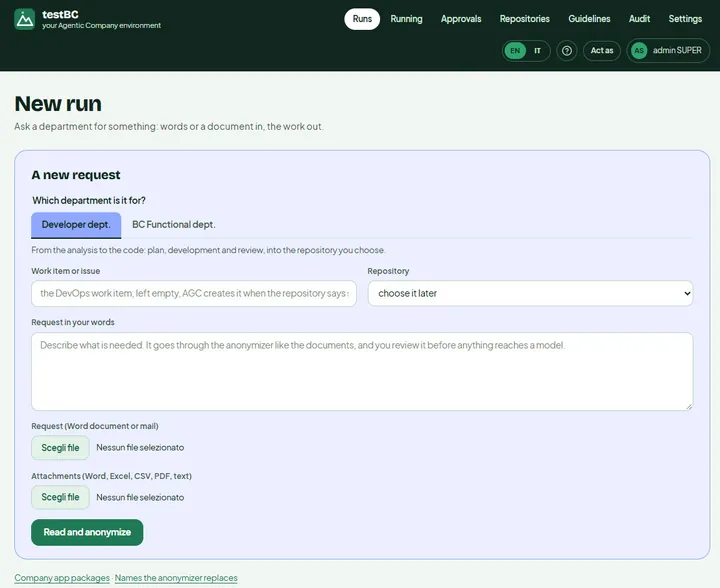 A new request: words or a document
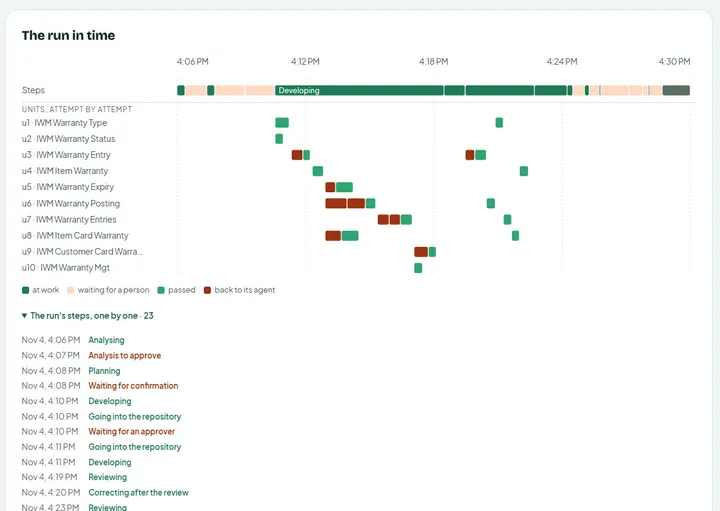 Units developed in parallel, attempt by attempt
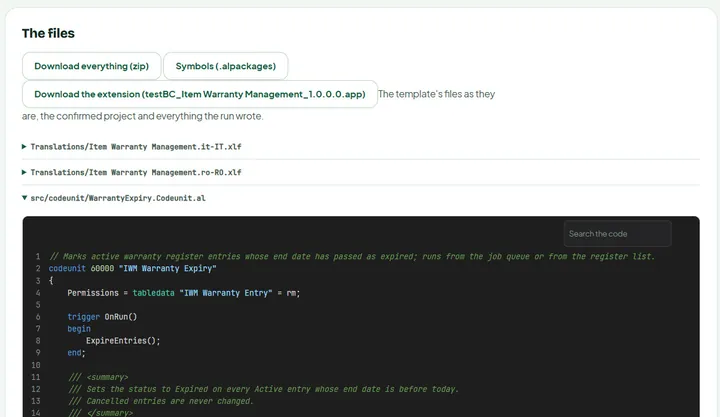 The .app, the sources and the symbols
See it work: approve, reject, close the gates.
Open the live demonstration of a Business Central development company. Follow a request from analysis to payment, and decide what the agents may do next.
Open the demo- Approve an analysis and a plan, and watch the developer agents start
- Sign a release to production: it takes two different people
- Issue the invoice and see the customer's payment arrive
- Close every gate at once, then reopen them
One price, every department.
Every department available · unlimited users and roles · gateway with rules, approvals and register · a dedicated Azure environment.
Billed yearly: €3,588, with a €200 voucher off the first year.
Choose annual- Azure DevOps
- GitHub
- Mail: notifications and the departments' own mail
Connectors are optional. Prices exclude VAT; AI model costs are on your own API key. The service runs on Microsoft Azure and depends on Azure working correctly.
AI models, with your own key- Anthropic Claude
- DeepSeek
Not sold by us: you choose the model for each department and worker, and the provider bills you.
Frequently asked questions
What do I need to start?
Business Central and an API key for the AI model: Anthropic Claude or DeepSeek. A repository in Azure DevOps or GitHub is optional.
How long does the setup take?
Within 120 minutes of the payment being confirmed. You can follow it by signing in to this site.
Where is my data?
In your own environment on Azure, in the Azure region you choose when you buy. It is not shared with other customers.
Can I cancel?
The monthly plan can be cancelled at any time. You can also ask for the platform to be deleted from your settings: the subscription then stays active until the end of the period already paid, with no refund.
Do you invoice companies outside Italy?
Yes. Every customer receives an invoice, in Italy and abroad.
I am a Microsoft partner: can I use it for all my customers?
Yes. Each project has its own rules, its own repository and a register that holds up in front of your customer. Users and roles are unlimited, so your whole team can work on it.
I am not a developer: can I still get an extension built?
Yes. You describe what you need in business terms, in a chat or in a document. The agents write the AL; someone in your company approves the plan and the release.
What if Microsoft Azure is not available?
Your environment runs on Microsoft Azure, in the Azure region you chose, and the service depends on Azure working correctly. If Azure, or one of its services in that region, is unavailable, your environment may be unavailable or slower until Azure recovers. Your data and your register stay in your environment. Azure publishes its status at azure.status.microsoft.